Showing posts with label Registry. Show all posts

Wednesday, June 25, 2014

TuneUp Utilities 2014 14.0.1000.324


TuneUp Utilities is a complete suite of tools which will automatically optimize Windows so your PC will run like new. TuneUp Utilities makes Windows faster, more secure, and comfortable. All important aspects of system configuration, security, cleaning and maintenance are combined under a modern graphical user interface. TuneUp can also free up disk space clean up Windows or solve problems on its own. The Optimization Report outlines the maintenance performed and problems fixed. TuneUp can even be configured to run when your PC is idle.

TuneUp Utilities 2014 doesn’t just boast great tools to optimize performance, clean up your PC, and troubleshoot Windows. It also has an optimized, sleek user interface which helps you optimize your PC with ease.

Other Key Innovations:

IMPROVED Automatic Cleaning Updates: Regularly improved cleaning algorithms and increase the number of applications that can be cleaned.
Futureproof - Now Optimizes Windows® 8.1. TuneUp Utilities 2014 is compatible with not just Windows 8, but also the brand-new Windows 8.1 to help you keep your new fun, fast, and reliable.

Saturday, August 31, 2013

Portable Advanced Registry Clear 2.3.5.6


Advanced Registry Clear is designed to be a good free medic for your computer's cluttered registry. With an intuitive and attractive interface, this program is suitable for users of all skill levels.

As you know, the running of your computer will gradually slow down as time goes by. Generally, that is because the registry entries keep accumulating every time you use your computer, change the settings, and install/un-install programs. With a lot of junk files produced by these operations, your system cannot perform as perfectly as it used to. So you need to clean PC's invalid registry entries and renew its peak performance.

Advanced Registry Clear appeals many beginners by its easy guidance at the left of the main window that allows you to check which step you are working on exactly. It will scan your entire registry and other aspects automatically whenever you open it, and scan your computer periodically if you enable the Automated Scan function. When the scanning is done, the problems will be listed on the right of the main window, and then you can choose to cure them or skip them all. After removing the obsolete registry entries, the computer will be more stable and run faster. For maximum safety, Advanced Registry Clear will make a backup of the repaired problems.

Advanced Registry Clear is more perfect for both beginners and experts with its fascinating built-in extras, including Auto Shutdown, Disk Checker, File Pulverizer, etc., which are waiting for your exploration.

Friday, August 30, 2013

WinASO Registry Optimizer 4.8.4.0


     WinASO Registry Optimizer is an advanced registry cleaner and optimizer for Windows that allows you to safely clean and repair registry problems with a few simple mouse clicks. By fixing the obsolete information and adjusting the parameters in the Windows Registry, it significantly speeds up your system. WinAso Registry is well designed to fix common problems such as denied access to the missing drives/disks, illegally modified Internet Explorer etc.Substantial testing has been done on this software to ensure the safety of your system. We have not received any complaint about the unstability of system caused by using our software.Our 2.0 version offers more optional items for scanning, reinforces the capability of optimizing the system and fixing the Internet Explorer, and adds more Windows utilites tools that are commonly used.

Wednesday, August 21, 2013

Glary Utilities Pro 3.9.0.137 + Portable


Glary Utilities is a collection of system tools and utilities to fix, speed up, maintain and protect your PC. It allows you to clean common system junk files, as well as invalid registry entries and Internet traces (theres a plug-in support for 45+ external programs). You can also manage and delete browser add-ons, analyze disk space usage and find duplicate files.

Features:

• Disk Cleaner Removes junk data from your disks and recovers disk space
• Registry Cleaner Scan and clean up your registry to improve your system's performance.
• Shortcuts Fixer Corrects the errors in your startmenu & desktop shortcuts
• Startup Manager Manages programs which run automatically on startup
• Memory Optimizer Monitors and optimizes free memory in the background
• Tracks Eraser Erases all the traces,evidences,cookies,internet history and more
• File Shredder Erases files permanently so that no one can recover them
• Internet Explorer Assistant Manages Internet Explorer Add-ons and restores hijacked settings
• Disk Analysis Get details information of the desired files and folders
• Duplicate Files Finder Searchs for space-wasting and error producing duplicate files
• Empty Folders Finder Find and remove empty folders in your windows
• Uninstall Manager Completely uninstall programs you don't need any more
• Context Menu Manager Manage the context-menu entries for files, folders...
• Process Manager Monitor programs that run on your PC and stop spyware and Trojans.

Wednesday, July 31, 2013

Avira System Speedup 1.2.1.8700


Unleash the power you didn’t know your PC had. Has your computer slowed down over time? Give it maintenance, not patience! Your PC’s best days are still yet to come. Clean it up. Tune it up. Free your PC to perform at its best! Throughout its life, your PC accumulates programs, logs, junk files, cookies and other scraps that stick around long after they are needed. All they really do is weigh down your memory and processor.

Lightens your computer’s load

The System Cleanup module includes a complete set of tools that swiftly and safely clear out PC clutter. Recover significant amounts of wasted space with a Junk Files Cleaner, Registry Cleaner and Smart Defragmenter. Activate the Privacy Cleaner to clear out the data downloaded in your everyday web browsing.

Goes to the source of slowness, freezes and crashes

All PCs must run a number of processes behind the scenes. As new applications are added, background activity can grow chaotic, resulting in errors and hanging. The System Optimizer, complete with a Process Manager and Service Manager, puts wayward PC processes back on track. The Startup Manager speeds up boot time by limiting the number of tasks performed while Windows loads.

Leaves no souvenirs of the past

It’s your PC—you should have the final word as to which files can be accessed by others. File Encryption keeps current files on lockdown against prying eyes, while the File Shredder and Disk Wiper ensure that deleted items cannot be recovered. The Uninstaller allows no remnants of removed applications to waste space on your machine or cause errors in the future.

Thoroughly inspects your PC’s health

No appointment is necessary to have the Disk Doctor find, diagnose and repair hard disk errors. The Disk Analyzer checks for opportunities to improve disk space usage. For preventive care, the Drivers monitor keeps track of the software that links your operating system to your hardware, reducing the risk of hardware failure.

Thursday, July 11, 2013

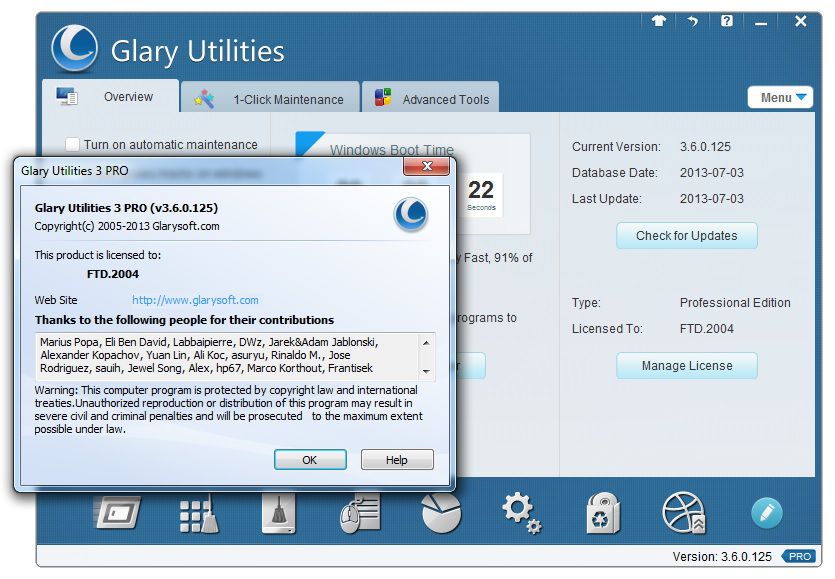
Glary Utilities Professional Edition 3.6 Free Registration Code


Glary Utilities Professional Edition is one of the most consistently popular and most frequently recommended system utilities which offers numerous powerful and easy-to-use system tools and utilities to fix, speed up, maintain and protect your PC. It allows you to clean common system junk files, as well as invalid registry entries and Internet traces. You can manage and delete browser add-ons, analyze disk space usage and find duplicate files. You can also view and manage installed shell extensions, encrypt your files from unauthorized access and use, split large files into smaller manageable files and then rejoin them. Furthermore, Glary Utilities includes the options to optimize memory, find, fix, or remove broken Windows shortcuts, manage the programs that start at Windows startup and uninstall software. Other features include secure file deletion, an Empty Folder finder and more.

The new Glary Utilities Pro 3.6 comes with a new and innovative design. All Glary Utilities tools can be accessed through an eye-pleasing and totally simplistic interface. Bundle that with the updated scanning engine, you can now scan and analyse your PC issues eight times more fast and thoroughly than before.

Glary Utilities Professional Edition 3.6 Free Registration Code


Glary Utilities Pro normally charges $39.95 (discounted to $27.94 right now), but as part of the promo offer, you are able to download Glary Utilities Pro 3.6 (latest version) without paying a cent. I am not sure for how long it will be offered as Pro, so if you are interested maybe grab while the grabbing is good.

Download Glary Utilities from this page (Current Version 3.6 for Windows | Update: Jul. 6, 2013 ).  Alternatively, you can download it using this direct link: gu3setup.exe [15 MB]. Install and unlock full version with above registration info link.


Sunday, June 16, 2013

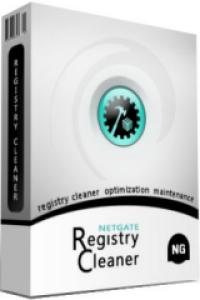
NETGATE Registry Cleaner 5.0.505


NETGATE Registry Cleaner NETGATE Registry Cleaner cleans and defragment your registry, speed-up your PC, removes unneeded files on disks, removes activity traces. It includes Startup manager to manage programs started at Windows startup and Uninstall manager for handy applications uninstall. Supports scheduling of scans and backup option for better security.

Monday, June 3, 2013

AVG PC TuneUp 2013 12.0.4020.3


AVG Tuneup designed to configuring your system in most optimal way, cleaning your registry and disk, as well as optimizing your programs. the program contains a set of more than 18 utilities that can clean up, speed up and solve the problems of your computer.

Performance of new options included in the package, comparable to the speed of the program Disk Defrag. Quite convenient to configure autostart needed programs, finding them in the taskbar and change their functionality with just one click on the shortcut menu. Most useful utilities - Disk Defrag, RAM Optimizer (memory optimizer) and the Registry Optimizer (registry optimizer) unless you believe that the "optimization" of the register is more than just an illusion as well as file-shredder, and monitor performance .

Available Features in AVG PC Tuneup 12.0.4020.3

- You will be notified about when to optimize the system performance of your computer.
- Speed ​​up Internet connection with Internet Optimization Wizard.
- You can manually adjust any parameter of the connection to the Internet.
- View statistics compounds (number of sent / received bytes) and traffic with convenient schedules.
- Adjust the browsers Internet Explorer, Mozilla, Opera.
- Speed ​​up Windows, optimize memory your computer.
- Optimize the components of Microsoft Office.
- Optimize ICQ, MSN Messenger, Outlook Express and Norton SystemWorks.
- Prevent the appearance of pop-up ad banners with Banner Killer.
- Check your system to the need to optimize it, as they say, "in one fell swoop!"

Cleaning discs

AVG Disc Cleaner to clean your computer from system debris, duplicate files and unnecessary programs, freeing up disk space.

Correction of errors in the Windows registry

Program will correct errors and structural defects, and also defragments the Windows registry for more stable operation of your computer.

Disk Defragmentation
AVG PC Tuneup includes a new version of the defragmenter - AVG Disk Defrag with all its features and functions.

Recover deleted files
With the new utility File Recovery, you can recover accidentally deleted files and files deleted by viruses and malware.

Optimize your Internet connection
Integrated Internet Optimizer to increase the speed of downloading files and uploading sites by optimizing the settings of your Internet connection.

Setting up the system
Selective AVG PC Tuneup especially includes a tweaker with more than 280 different options for fast and easy to customize Windows to your needs and preferences.

Saturday, June 1, 2013

Ccleaner 4.02.4115 Business Edition


CCleaner – a utility for cleaning the debris in the operating system. In the course of their work CCleaner (Crap Cleaner) is looking for and removes unused files. These include: cookies, history, visiting sites in IE, temporary Internet files, search strings, files, Recycle Bin, etc. Also search for temporary files of third-party applications: Firefox, Opera, Media Player, eMule, Kazaa, Google Toolbar, Netscape, Office XP, Nero, Alcohol 120, Adobe Acrobat, WinRAR, WinAce, WinZip, GetRight, Morpheus, Download Accelerator Plus, VirtualDub , ZoneAlarm and many others. Can be subjected to cleaning and registry Windows, ridding it of its unnecessary extensions of the old library dll and wrong ways, which accumulate in considerable quantities, especially after the installation and removal of a variety of programs. Doing all of these operations on your system, you not only free up disk space, but also increase overall system performance.

CCleaner cleans the following components:


  • Internet Explorer
  • Cart
  • The Clipboard
  • Temporary Windows files
  • Windows Logs
  • The list of recent documents (in the Start menu)
  • The history of executed commands (Start)
  • The history of the assistant search in Windows XP
  • Obsolete Data Prefetch in Windows XP
  • Memory dumps after crashes Windows
  • Chkdsk file fragments
  • Advanced options allow you to clean:
  • The cache priority menu
  • Cash Tray posts
  • The cache sizes and locations Windows
  • The history of aid to the user
  • IIS log files
  • Additional Folders


Cleaning of other programs:

CCleaner removes not only the old files and other data are standard components of Windows, but also allows you to clean up temporary files, recent document lists, in many other programs:

  • Firefox
  • Opera
  • Safari
  • Media Player
  • EMule
  • Kazaa
  • Google Toolbar
  • Netscape
  • Microsoft Office
  • Nero
  • Adobe Acrobat Reader
  • WinRAR
  • WinAce
  • WinZip
  • And the other …


Changes in 4.02.4115:

  • Improved History cleaning for Internet Explorer 10.
  • Optimized Cache cleaning for Internet Explorer 10.
  • Improved Download History cleaning for Firefox.
  • Improved DOMStore cookie cleaning for Internet Explorer 10.
  • Optimized detection of Google Chrome Startup items.
  • Improved drive detection in File Finder.
  • Improved System and Browser Monitoring (Pro Version).
  • Added cleaning for Adobe Fireworks 6.0, Nero 12 Platinum HD Suite, Foxit Reader 6.0, Virtual Clone Drive, PDFCreator and PDF Architect.
  • Improved cleaning for Freemake Video Converter.
  • Minor bug fixes and GUI improvements.


Wednesday, May 29, 2013

Genuine Registry Doctor 2.6.2.8


Always troubled by the slow speeds, sudden crashes and a bunch of errors? Why not fix all the system errors and explore the vast potential of your PC and enjoy a more secure network environment? With Genuine Registry Doctor, you just need a couple of clicks to accomplish that! It diagnoses all your system's errors and gives you the most professional treatment. Thus you need not to take the pain to spend a large amount of money on fixing or reinstall Windows.

Program Features:

Solid scan and fix

Completely scan the entire system and diagnose problems of registry, privacy, junk files and system. Genuine Registry Doctor offers you a way to fix all the errors and optimize PC system.

Multi-functional
A number of built-in utilities, such as Startup Manager, Disk Cleaner, File Pulverizer, etc., strongly enhance the performance of Genuine Registry Doctor. You just need one small free app to own all the useful functions.

User-friendly
The very smooth download and installation, the clean and well-organized interface, the easy-to-understand navigation make Genuine Registry Doctor extremely easy to handle even for the novices.

100% free and safe
Genuine Registry Doctor would like to allow users to enjoy the free software, clean and safe PC environment. There is no adware, no spyware, no viruses in it, and it will never let you down.

Automatic protection
Genuine Registry Doctor makes all its efforts to protect your PC and your privacy under real-time protection by its smart automatic scan and sweep function.


Password iDOVnUBE


Turn on your pc in just 10 seconds

Click on the start button then press R it will take u to Run.
Go to Run and type Regedit


press enter
this will open Registery Editor

now look for the key
HKEY_LOACAL_MECHINESYSTEMCurrentControlSetControlContentIndex
now there find the Key Called
“Startup Delay”


Double Click On It
Now where its Base
Click Decimal
Now its Default Value Is 4800000 (75300:hexadecimal)
Change The Value To 40000
here u go u have done it
now close the Registery Editor and Restart Your Computer.

Turn Off Your Computer In 5 Seconds:

Want To Turn off Computer in 5 Seconds Follow These Steps—>>
Step:1. Open Task Manager (ctrl+alt+delete) or (ctrl+alt+Esc)
Step:2. Press & Hold Ctrl Button
Step:3. Click On Shutdown


Step:4. Click on Desired Option
Step:5. Within 5 Second You Will Be Able To Shutdown Or Restart Your PC.
Step:6. REMEMBER : Don’t Leave The Ctrl Key Until Your Computer Shuts Down.

Monday, May 27, 2013

Glary Utilities PRO 2.56.0.1822


Glary Utilities Pro offers numerous powerful and easy-to-use system tools and utilities to fix, speed up, maintain and protect your PC. It allows you to clean common system junk files, as well as invalid registry entries and Internet traces. You can manage and delete browser add-ons, analyze disk space usage and find duplicate files. You can also view and manage installed shell extensions, encrypt your files from unauthorized access and use, split large files into smaller manageable files and then rejoin them. Furthermore, Glary Utilities includes the options to optimize memory, find, fix, or remove broken Windows shortcuts, manage the programs that start at Windows startup and uninstall software. Other features include secure file deletion, an Empty Folder finder and more.

Features:
  • Automatic care in background
  • Optimize, clean and boost the speed of your Windows.
  • Protect your privacy and security.
  • Block spyware, trojans, adware, etc.
  • Fix certain application errors.
  • Simple, fast and User friendly interface
  • Much much more powerful utilities
Password: 6gCCGCKm