Showing posts with label JDownloader Password Decrypter. Show all posts

Tuesday, August 13, 2013

JDownloader Decrypter 2.0


JDownloader Decrypter 2.0 for Jdownloader Beta 2.


JDDecrypter is the FREE software to instantly recover premium account passwords from JDownloader2 database ('org.jdownloader.settings.AccountSettings.accounts.ejs').

Features:
No installation required
Instantly decrypt and recover stored premium account passwords from JDownloader2.
Recover passwords of any Host
Recover password of any length and complexity.
Save the recovered password list to HTML file or TXT for transferring to other system or publish on internet.
User friendly GUI interface.

Download Here.

Monday, May 13, 2013

JDownloader Decrypter 1.9


JDownloader Decrypter 1.9 for Jdownloader Beta 2.


JDDecrypter is the FREE software to instantly recover premium account passwords from JDownloader2 database ('org.jdownloader.settings.AccountSettings.accounts.ejs').

Features:
No installation required
Instantly decrypt and recover stored premium account passwords from JDownloader2.
Recover passwords of any Host
Recover password of any length and complexity.
Save the recovered password list to HTML file or TXT for transferring to other system or publish on internet.
User friendly GUI interface.

Download Here.
Password - wbkzhWBV

Tuesday, February 26, 2013

JDownloader Password Decryptor 2.0


JDownloader Password Decryptor is the FREE software to instantly recoverpremium account passwords from JDownloader and Jdownloader Beta 2 .

JDownloader is popular downloader software that simplifies and automates downloading file from many shareware and premium download sites such as Rapidshare.com, Megaupload etc. JDownloader Password Decryptor helps in quickly recovering all these stored premium account passwords from JDownloder database.
  • Instantly decrypt and recover stored premium account passwords from JDownloader.
  • Recover passwords from local as well as remote system after copying the database.
  • Recover password of any length and complexity.
  • Save the recovered password list to HTML file for transferring to other system or for future use.
  • Easier and faster to use with its user friendly cool GUI interface.
  • Support for local Installation and uninstallation of the software.
  • Launch JDownloaderPasswordDecryptor on your system after the installation.
  • Select the installation location of JDownloader. Typically it will be at 'C:\Program Files\JDownloader'.
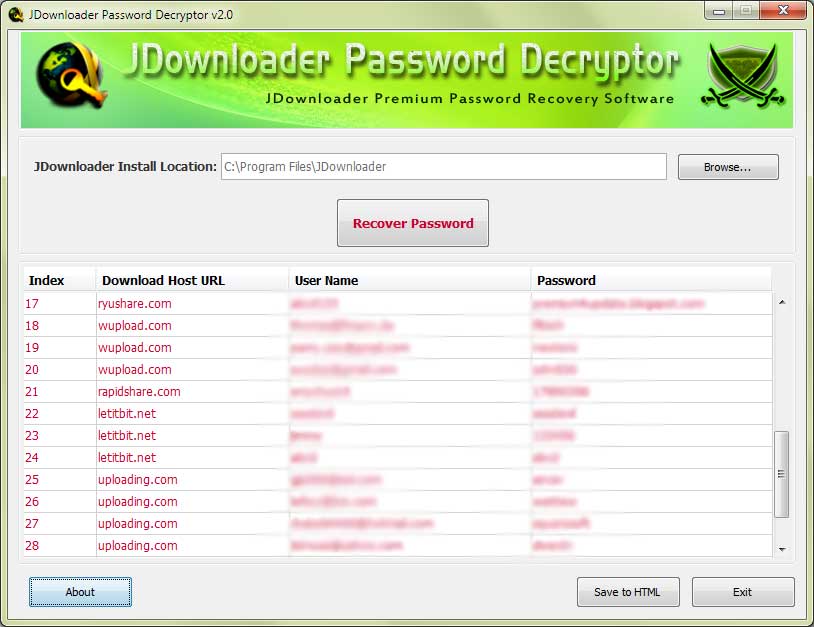
  • Next click on 'Recover Password' button. Instantly all the stored premium account passwords by JDownloader will be recovered & displayed as shown in screenshot 1 below.
  • Finally you can save all recovered password list to HTML file by clicking on 'Save to HTML' button.

JDownloader Decrypter 1.8


JDownloader Decrypter 1.8 for Jdownloader Beta 2.


JDDecrypter is the FREE software to instantly recover premium account passwords from JDownloader2 database ('org.jdownloader.settings.AccountSettings.accounts.ejs').

Features:
No installation required
Instantly decrypt and recover stored premium account passwords from JDownloader2.
Recover passwords of any Host
Recover password of any length and complexity.
Save the recovered password list to HTML file or TXT for transferring to other system or publish on internet.
User friendly GUI interface.

Download Here.

Wednesday, December 12, 2012

JDownloader Decrypter 1.7


JDownloader Decrypter 1.7 for Jdownloader Beta 2.

Decrypt account and password of 'org.jdownloader.settings.AccountSettings.accounts.ejs' (JDownloader2 account) 
  • Fix Bugs
  • Speed Increased
Download Here.

Wednesday, November 14, 2012

JDownloader Password Decryptor 2.0


JDownloader Password Decryptor is a software to instantly recover premium account passwords from JDownloader 0.9x. It simplifies and automates downloading file from many shareware and premium download sites such as Rapidshare.com, Megaupload etc. 

JDownloaderPasswordDecryptor helps in quickly recovering all these stored premium account passwords from JDownloder database.

New version 2.0 supports Password Recovery from latest version of JDownloader 2 Beta edition.
  • Instantly decrypt and recover stored premium account passwords from JDownloader.
  • Recover passwords from local as well as remote system after copying the database.
  • Recover password of any length and complexity.
  • Save the recovered password list to HTML file for transferring to other system or for future use.
  • Easier and faster to use with its user friendly cool GUI interface.
  • Support for local Installation and uninstallation of the software.

Wednesday, October 31, 2012

JDownloader Decrypter 1.6

JDownloader Decrypter 1.6 for Jdownloader Beta 2.

Decrypt account and password of 'org.jdownloader.settings.AccountSettings.accounts.ejs' (JDownloader2 account) 
  • New Feautures Added
  • Reduced Size

Steps to decrypt jdowloader premium database :

1. First of all download JDwonloder password decrypter from here.

2. Extract the file and double click on "JDDecrypter.exe" and you will see a small window like below .

3. Click on "get password" and it will open a new window, wait for 5 seconds. Click on "skip add" and get your password and finally click on  OK.
 
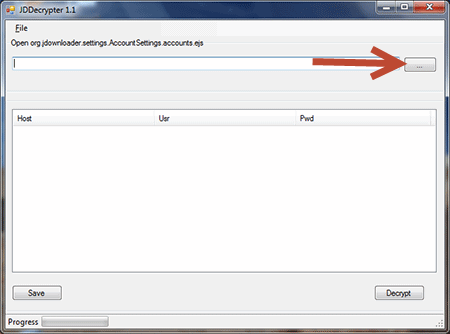
 4. Click on browse button as shown below and open any '.ejs' file and click on Decrypt button to  start decrypting.


5. It will automatically start decrypting the database you add and within few seconds it will display all premium account along with their username and pasword.

6. You can save these all username and password as text file by clicking on save button.

That's all, enjoy your premium accounts.

Tuesday, October 2, 2012

JDownloader Decrypter 1.4


JDownloader Decrypter 1.4 for Jdownloader Beta 2.

Decrypt account and password of 'org.jdownloader.settings.AccountSettings.accounts.ejs' (JDownloader2 account) 
  • Fixed Some Bugs
  • Improve Performance


Steps to decrypt jdowloader premium database :

1. First of all download JDwonloder password decrypter from here.

2. Extract the file and double click on "JDDecrypter.exe" and you will see a small window like below .


3. Click on "get password" and it will open a new window, wait for 5 seconds. Click on "skip add" and get your password and finally click on  OK.
 
 4. Click on browse button as shown below and open any '.ejs' file and click on Decrypt button to  start decrypting.


5. It will automatically start decrypting the database you add and within few seconds it will display all premium account along with their username and pasword.


6. You can save these all username and password as text file by clicking on save button.

That's all, enjoy your premium accounts.

Monday, July 30, 2012

JDownloader Password Decrypter 1.2

JDownloader Password Decryptor is the FREE software to instantly recover premium account passwords from JDownloader. JDownloader is popular downloader software that simplifies and automates downloading file from many shareware and premium download sites such as Rapidshare.com, Megaupload etc. JDownloader Password Decryptor helps in quickly recovering all these stored premium account passwords from JDownloder database.
Show account and hidden password of “org.jdownloader.settings.AccountSettings.accounts.ejs”
•Fix Same Bug
•File Saved in HTML
•OTP Valid for 12 hours
Required:
  • Microsoft .Net Framework 4.0
  • Java VM
  • Last Java JDK 
  • Active internet connection
Steps to decrypt jdowloader premium database :

1. First of all download JDwonloder password decrypter from here.

2. Extract the file and double click on "JDDecrypter.exe" and you will see a small window like below .

3. Click on "get password" and it will open a new window, wait for 5 seconds. Click on "skip add" and get your password and finally click on  OK.
 
 4. Click on browse button as shown below and open any '.ejs' file and click on Decrypt button to  start decrypting.


5. It will automatically start decrypting the database you add and within few seconds it will display all premium account along with their username and pasword.


6. You can save these all username and password as text file by clicking on save button.

That's all, enjoy your premium accounts.